Cheapest PC Build for Running Local AI Under 600 Dollars
When people ask me about the cheapest PC build for running local AI under 600 dollars, they usually expect me to start listing motherboards, power supplies, and a hunt for a used Nvidia GPU on the secondhand market. I used to give that answer too. After spending a lot of time benchmarking machines in my home lab, I changed my mind. The cheapest sensible build that actually runs serious local language models in 2026 does not come from Newegg parts bins. It comes from Apple. Specifically, it is the base Mac Mini with the M4 chip, sitting at exactly the 600 dollar price point.
I know that sounds strange coming from someone who runs a home lab. Apple is usually the brand you pay extra for because of the logo. In this single category, local AI inference, Apple has a real technological advantage that flips the value equation. I want to walk you through why the traditional DIY route fails the budget test, what the Mac Mini M4 actually runs, and where I would spend extra dollars if you can stretch the budget.
Why does a DIY Nvidia PC fail at the 600 dollar budget?
The default mental model for a local AI rig is Windows or Linux plus an Nvidia GPU. That stack works because Nvidia has spent years writing both the hardware and the software to make AI usable on consumer cards. The problem is not raw compute. The problem is memory.
A consumer PC has two completely separate pools of memory. There is system RAM, which the operating system uses to run programs, and there is VRAM on the GPU. To run a local large language model, you need to load the entire model file into VRAM. The GPU can be powerful, but if the model does not fit, you cannot run it. You are forced down to a smaller variant.
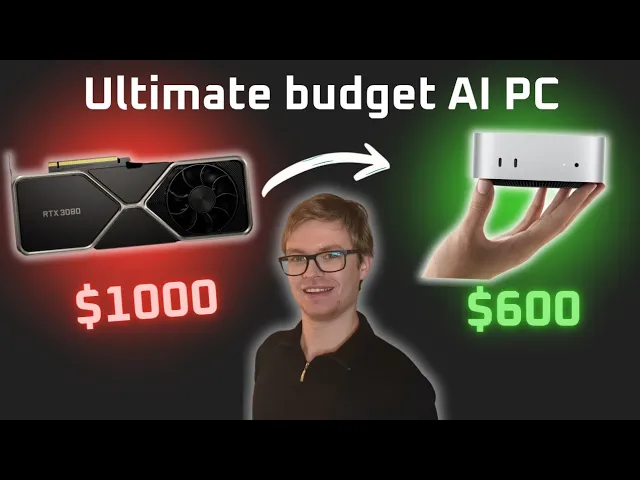
Here is the math that breaks the budget. System RAM is cheap. A consumer PC starts at 16 GB and you can push to 32 or 64 GB without much pain. VRAM is the opposite. A used RTX 3080, which is a strong Nvidia chip, sells on the secondhand market for around 300 dollars and only gives you 10 GB of VRAM. That single component eats half the budget and leaves you with 10 GB to work with. You still need a CPU, a motherboard, RAM, an SSD, a power supply, and a case. By the time you finish, you are well over 600 dollars and you still cannot fit a 32 billion parameter coding model. I cover the full breakdown of VRAM requirements for local AI coding in another post if you want to see why those memory numbers matter so much.
There is also the operating system question. If you go this route, you have to decide between Windows and Linux, and the answer is not obvious for AI workloads. I wrote about Linux versus Windows VRAM usage for local AI because the OS overhead is not zero. On a tight 10 GB VRAM budget, every gigabyte the operating system steals from your model is a gigabyte you do not have for inference.
What makes the Mac Mini M4 the cheapest real local AI build?
Apple has done something with the M series chips that no other vendor has matched at the consumer price point. It is called unified memory architecture. Instead of splitting memory into RAM for the CPU and VRAM for the GPU, you get one shared pool that both can access. The CPU uses it to run your operating system and applications, and the GPU uses the exact same memory to run AI models.
That single architectural choice is why the math works. The base Mac Mini with the M4 chip ships with 16 GB of unified memory and sells for 600 dollars new from Apple. That entire 16 GB is available to the GPU when you load a model. Compare that to the 10 GB VRAM ceiling on a 300 dollar used RTX 3080 that does not even include the rest of the PC, and the Mac Mini wins on memory before you even consider the rest of the system.
You also do not need to source parts. There is no motherboard to pick, no PSU wattage to calculate, no case airflow to worry about. The Mac Mini is the entire PC. You plug in a monitor, keyboard, and mouse, and you are running models the same evening. For a beginner who wants to actually start experimenting instead of debugging hardware, this matters more than the spec sheet suggests. I made the same argument in my post on how to learn AI without expensive hardware, because the friction of building a rig is often what stops people from ever running a model.
What models can you actually run on the 600 dollar Mac Mini?
I tested this in LM Studio on the base 16 GB Mac Mini M4 and the answer is genuinely better than I expected for the price. The 7 billion parameter Mistral model, quantized down to about 4 GB on disk, runs comfortably with plenty of headroom. Microsoft’s Phi 4 model, which is a 14 billion parameter model that lands around 9 GB after quantization, also runs fine. Those two cover a wide range of practical home lab use cases, from chat assistants to summarization to local agents.
Where you hit the wall is the 32 billion parameter class. The Qwen 32B model is excellent for local coding tasks, but it takes almost 20 GB of memory to run. The base 16 GB Mac Mini cannot fit it. That is the real ceiling on the 600 dollar tier. If your goal is local coding with the strongest open models, you will eventually want more memory. If your goal is to learn, prototype agents, run RAG over your notes, or build embedding pipelines, 16 GB is plenty. I keep a more detailed comparison of which models fit which memory tiers in my cost effective local LLM setup guide.
One honest caveat. Not every AI model on the internet ships with Apple silicon support on day one. Most of the popular ones do, because the community has done the work, and the major frameworks like llama.cpp, MLX, and Ollama all target Apple silicon natively now. Niche research models sometimes lag. In my home lab experience, that has almost never been a blocker for the kinds of projects I actually build.
If you want a head start on what to build once the machine is on your desk, I keep a running list of the local AI projects I run on my own Mac Mini. You can browse the open source local AI projects I publish and pick one that matches what you want to learn first. Most of them run fine on the base 16 GB tier.
When should you spend more than 600 dollars on the Mac Mini?
Apple offers upgrade tiers from the 600 dollar base, and not all of them are worth it. I want to be specific about which dollars give you real local AI value.
The first upgrade Apple shows you is 800 dollars for double the SSD storage. AI models do take up disk space, but paying 200 dollars for that storage jump is the classic Apple tax. I would skip it. An external SSD over USB or Thunderbolt is far cheaper and works fine for storing model weights you swap in and out.
The upgrade I would actually pay for is the 1000 dollar tier, because it gives you 24 GB of unified memory. That is the jump that lets you run a 32 billion parameter model like Qwen locally. Twenty four gigabytes of GPU accessible memory is genuinely hard to find at any price in the Nvidia consumer lineup. You would need to spend significantly more on a card alone, before adding the rest of the PC, to match it. If you already know local AI is something you want to use seriously, this is the tier I would point you at.
Above that, there is the 1400 dollar M4 Pro Mac Mini. You still get 24 GB of unified memory, but the chip is faster, so inference runs noticeably quicker. I personally do not mind waiting an extra ten seconds for an image generation if it means I can experiment with more models for less money, so I stay on the base M4 chip. If your time matters more than your dollars, the M4 Pro is reasonable.
The Mac Studio sits above all of this. The entry tier is around 2000 dollars with an M4 Max and 36 GB of unified memory. The top configuration runs to 4000 dollars with 96 GB of unified memory. That number is genuinely hard to comprehend in the Nvidia consumer world. There is essentially no affordable consumer GPU that approaches 96 GB of memory accessible to AI workloads. If you are pushing toward 70 billion parameter models or larger, the Mac Studio becomes the sane option, even though it is far above our 600 dollar target.
What is the right call for someone starting out?
If you are starting with local AI, buy the 600 dollar base Mac Mini M4. You cannot go wrong with it. You can try dozens of different models, run agents, build RAG systems, and learn what local inference actually feels like. If after six months you decide local AI is not for you, you still own a fast, quiet, low power desktop that handles anything else you would do with a personal PC. The downside risk is essentially zero.
If you are already confident local AI is part of your future, push to the 1000 dollar tier with 24 GB of unified memory. That single upgrade unlocks the 32 billion parameter coding models, which is where local development assistants get genuinely useful. If you are very confident and you value speed, the M4 Pro at 1400 dollars is worth the extra cost.
What you should not do is spend 600 dollars trying to assemble a DIY Nvidia PC. The numbers do not work. You will end up with a machine that runs smaller models more slowly, with more setup friction, more power draw, and more noise sitting next to you on the desk. The unified memory architecture is the part nobody else has figured out yet at this price point, and it is the reason the cheapest real local AI build for 2026 has an Apple logo on it.
If you want to see me walk through the exact tiers and pricing in real time on Apple’s website, watch the full breakdown on YouTube here: https://www.youtube.com/watch?v=VGnw5Blcmm0. And if you want to learn how to actually run any AI model locally once your new Mac Mini arrives, come join the AI engineers I teach inside the community at https://aiengineer.community/join. I will see you there.
